Release Notes
Changes to the SkyPortal web app and SARA, newest first. For the skyportalai package (SDK, CLI and observability agent), see skyportalai releases.
August to October 2026
Kubernetes
- In-cluster agent. Connect a cluster whose API server isn't reachable from the internet, without sharing a kubeconfig. The agent only makes outbound HTTPS calls and only runs read-only
kubectl, and a node DaemonSet reports CPU, memory, disk and GPU usage. Needs the agent fromskyportalai0.3.0 or later. See In-cluster agent. - Guided setup in chat. Ask SARA to connect a private cluster. After you approve, it creates an agent token, hands it over once and walks you through the Secret and the Helm install.
- Pod right-sizing. Ask SARA to compare pod requests and limits with actual usage. See Monitoring.
- SARA knows which hosts and clusters are in scope, and points out unhealthy pods when you ask how things are going.
- SARA can read vLLM serving metrics from a cluster's own metrics store when it can't reach vLLM directly.
- An SSH host that runs its own Kubernetes cluster can run
kubectlthere. - Kubeconfigs that set a cluster
proxy-urlare now refused. - Agent tokens stop working when their owner is deactivated, or hasn't set up two-factor authentication that the organization requires.
- The Agents page is now called Agent Tokens, and it shows the version of each connected agent.
Commands and approvals
- Read-only commands across several hosts can run in one batch. Anything that needs an approval is still asked one command at a time.
- A recursive
grepfor passwords, secrets or tokens is treated as sensitive, andfindis classified by its arguments, sofind -deleteandfind -execare no longer treated as safe reads. - Naming a host in your message adds it to the chat's scope.
- SARA checks a plan's acceptance condition before it marks the plan as done.
Security
- Secret redaction. Secrets are removed from command output before the model sees it, and from everything SkyPortal stores or shows, including tokens embedded in URLs and
key = valuefiles. See Security. - Reply screening. Every reply from SARA is checked before you see it. Secrets are redacted, and a reply that appears to expose internal instructions is withheld.
Teams and enterprise
- Team roles. Admin, Maintainer and Read-only, with a ceiling per environment, enforced by the server. See Team roles.
- Enterprise identity. SAML and OIDC single sign-on, required two-factor authentication, SCIM provisioning and session limits. Okta SCIM groups can map to team roles.
- Audit trail. Every approval records who decided, how and through which channel, along with SARA's tool calls. The trail is append-only and hash-chained, and you can export it from
GET /api/v1/audit/events/. See Audit and events. - The two-factor sign-in step now matches the login page.
Chat
- File uploads. Attach logs, CSV, JSON and YAML files up to 10 MB to a chat. Secrets in them are redacted when they are uploaded.
- Reliability fixes for scope changes, cancelling, stalled turns and Kubernetes output.
Infrastructure and experiments
- Oblivus. From a chat, deploy Oblivus VMs, list flavors and your balance, list or import VMs, and delete them after a typed confirmation. The API key is collected masked and stored encrypted.
- Your own model storage. Use your S3, GCS, Azure Blob or MinIO bucket as a model source and output destination. Credentials are stored encrypted.
- Host inventory API for one host or the whole fleet.
API and CLI
skyportalai loginnow finishes in the browser. The key it creates expires after 90 days, and members who only sign in through SSO can create one.- The CLI shows the monthly limit message, and
/serverslists SSH hosts and Kubernetes clusters with their GPU, CPU and RAM totals.
Billing
- Usage credits, with spend limits.
- When a card payment is declined, only SARA pauses. Your hosts, logs and history stay available.
- Teams can add seats beyond the first five.
- The billing address is now required at checkout.
June and July 2026
Environments and approvals
- Per-environment policy. Production is read-only, Staging is standard and Dev is unrestricted by default. Destructive commands aimed at a read-only environment are blocked. See Environment policies.
- Action Approvals. An account-wide setting with Ask and Auto-approve. Policy checks still apply in both. See Auto-approve.
- Plan steps can target an environment, a host or a list of hosts, and the plan card shows each step's target by hostname.
mkfsvariants are treated as destructive.
Kubernetes
- Kubernetes clusters as hosts. Add a cluster with a kubeconfig, or with an API URL and a token, and test the connection before saving.
kubectlruns on SkyPortal's servers. Kubeconfigs with exec credential plugins are refused. See Kubernetes. - Namespace scope, with an All namespaces option.
- A Kubernetes monitor with per-GPU detail and GPU metrics across nodes.
- Clusters can be edited after they are added, and added from a chat.
- Plans that mix SSH hosts and clusters run end to end.
- Agent tokens, a page to manage them, and a Docker image and Helm chart for the cluster agent.
Chat
- Ask SARA about your ML runs. The observability agent also collects vLLM serving metrics.
- Ansible playbooks from a chat: create, list, update, delete and deploy, with every deployment recorded.
- When SARA needs a server, the picker lists your hosts, and the turn continues after you choose.
- A clear message when the AI providers are unavailable.
API access
- Named API keys on the API Keys page, and short-lived access tokens.
- A headless API for chats driven from the CLI: a status for when SARA waits for your input, multi-server scope, Kubernetes endpoints, and approvals that resume in the background.
Plans
- The free tier shows a usage indicator and tells you when the limit is reached.
March to May 2026
Chat and agent
- Chats get a short title after your second message.
- Revise Plan sends your feedback, and SARA rewrites the plan for a new approval.
- A more compact approval card for commands and plans, and confirmation dialogs styled to match the app.
- A recent-chats list inside the chat panel.
- The theme follows your system's light or dark setting.
- When an SSH test fails while you add a host, an Ask SARA bubble brings the error into the chat. After repeated failures it offers a pre-filled support ticket, and SARA can open a ticket with credentials removed.
- SARA waits for a vLLM service's health endpoint before it reports a deployment as successful.
Hosts
- Adding a host tests the SSH connection before saving.
- Add hosts from a chat, with masked credentials, or import several at once.
- Duplicate host names are refused. Deleting a host warns about its use cases and removes them.
- The file explorer works on hosts that only accept SSH keys.
Repositories
- Cloned repositories are indexed for search, and re-indexing only touches changed files. SARA restores a repository's context when you come back to a server.
- Agent Settings lists indexed repositories, with delete and re-index, and stores a GitHub token encrypted for private repositories.
Approvals
- Layered pre-approval: a repository's
.skyportal/settings.jsonallow and deny lists, then host permit lists, matched by prefix. See Permit lists. - Approve all on a compound command saves each part separately.
- Approval buttons keep their state after a page refresh.
Multi-host and teams
- Multi-host chats. Pick several hosts in the Scope pill. Commands run on all of them, with results per host. See One command across many hosts.
- Team workspaces. Create a team, invite people by email, and share hosts and chats.
Observability and account
- The observability agent for Weights & Biases and MLflow, with a one-line install, and a new Observability dashboard with SARA's chat panel.
- Passwords need at least 12 characters and are checked against known breaches.
- Yearly billing. The Premium plan is now called Teams.
v1.2 (March 2026)
Version: 1.2
Release Type: Feature & Reliability Update
Status: General Availability
1. Overview
Version 1.2 delivers significant improvements to the SkyPortal AI Chat experience, backend reliability, and platform analytics. Key highlights include a redesigned turn-based conversational interface, smarter error recovery, and improved agent command routing.
2. Turn-Based Conversational UI with Collapsible Actions
The AI Chat interface has been redesigned with a turn-based conversational model:
- Each agent turn is clearly separated, making conversations easier to follow
- Intermediate agent actions (tool calls, reasoning steps) are grouped into collapsible sections — keeping responses clean while still exposing full detail on demand
- Improved readability for long multi-step agent interactions
This update makes working with the SkyPortal Agent feel more like a natural back-and-forth conversation, with less visual clutter from tool call outputs.
3. Faster & More Reliable Agent Command Execution
Agent commands are now routed through Celery, SkyPortal's background task queue, instead of the previous xterm WebSocket path. Benefits include:
- More robust handling of long-running commands
- Commands continue executing even if the browser tab is temporarily inactive
- Improved visibility into task status and queuing
4. Smarter Context Window Management
The agent now gracefully handles situations where a conversation grows too long for the model's context window:
- Automatically applies progressive history truncation to trim older messages when the limit is reached
- Conversations that previously failed with a context overflow error now continue seamlessly
- Older, less relevant turns are pruned first to preserve recent context
5. Impact Summary
- Better UX: Turn-based chat UI makes agent interactions clearer and more intuitive
- Higher Reliability: Celery-based command routing and context overflow recovery reduce failure rates
Host Management v1.0
Version: 1.0
Release Type: Major Feature Expansion
Status: General Availability
1. Overview
This release introduces the full production version of Skyportal Host Management, marking a significant evolution from the initial beta. The Skyportal Agent has now matured into a fully autonomous ML infrastructure assistant capable of discovering, configuring, orchestrating, and observing compute environments across clouds and on-prem systems.
This version delivers a unified control plane for:
- Multi-cloud host connectivity
- Environment awareness
- Autonomous system configuration
- Remote data access
- Dependency resolution
- Experiment observability
This release enables infrastructure to operate as a living system—adaptive, inspectable, and self-optimizing.
2. Cross-Cloud Host Access via Secure SSH
Skyportal now supports direct, secure SSH connectivity to any host across any cloud or on-prem environment. With a single host registration step, users can:
- Attach AWS, GCP, Azure, and on-prem machines
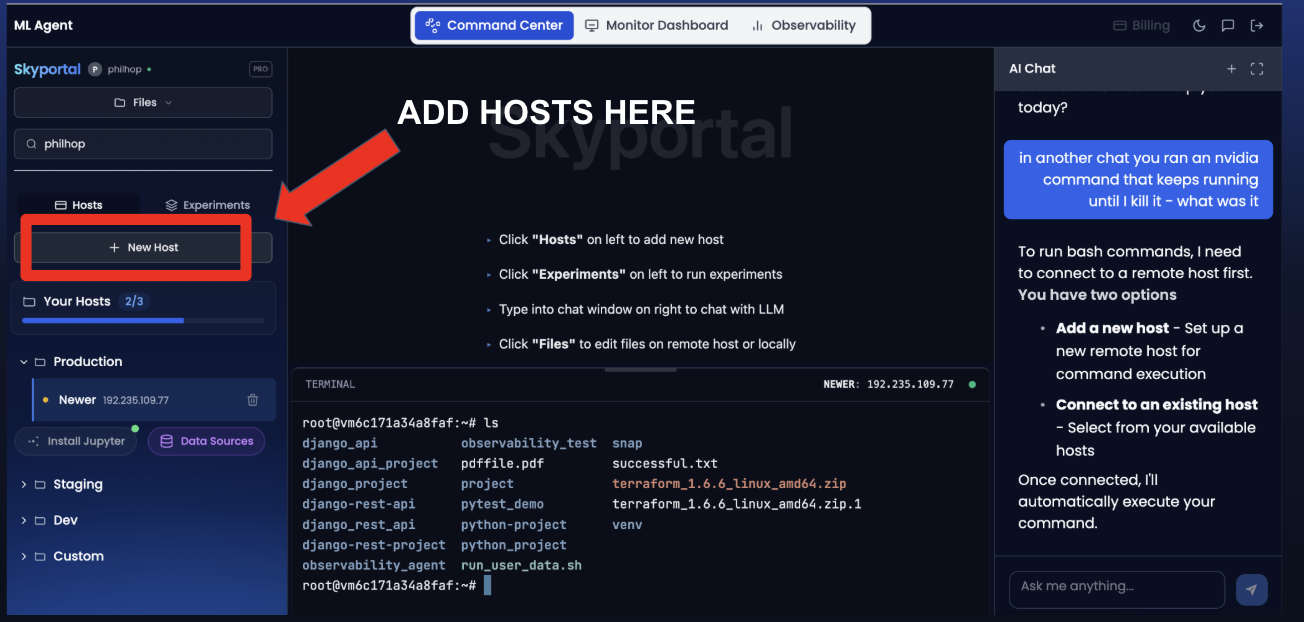
- Authenticate using SSH keys
- Maintain persistent secure connections
- Add many hosts and click to interact with each
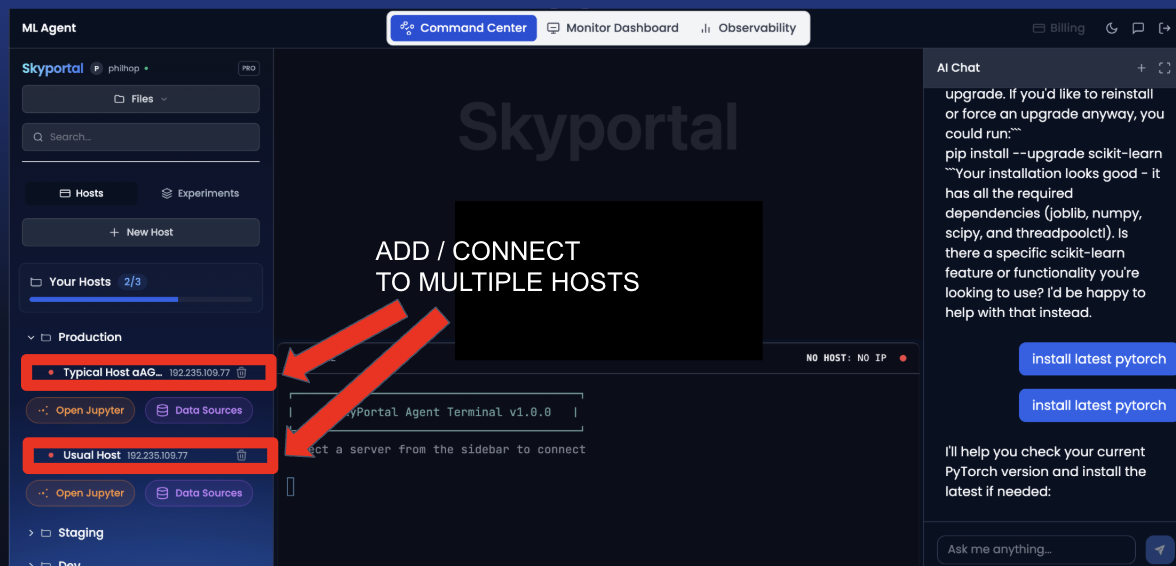
- Switch between hosts instantly
- Execute commands via:
- Skyportal's built-in terminal
- The Skyportal Agent conversational interface
This removes the need for manual SSH workflows and fragmented access tools.
3. Automatic Hardware & Software Environment Detection
Once a host is connected, the agent performs automatic full-stack environment introspection, including:
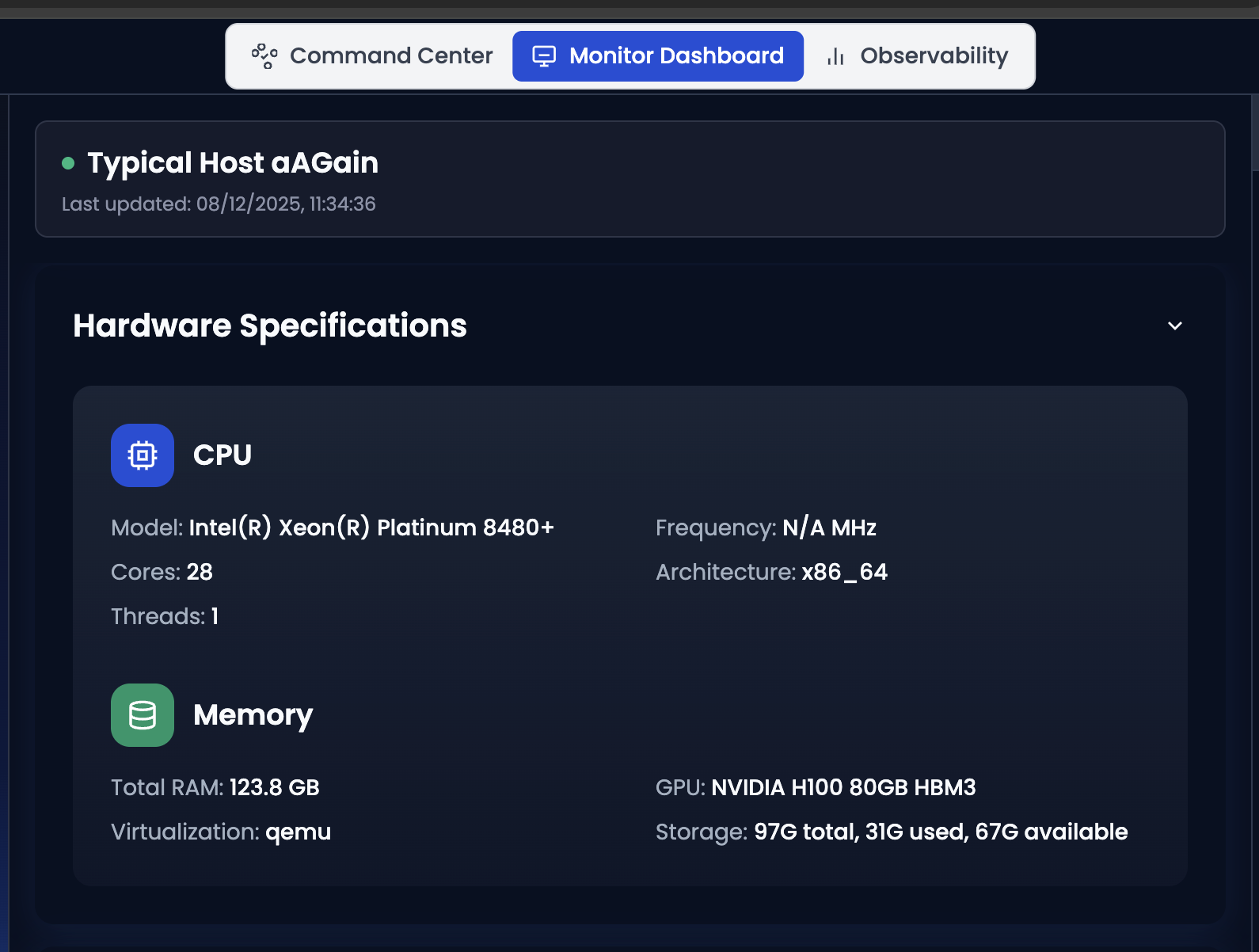
- CPU architecture and core counts
-
GPU model, memory, and driver versions
-
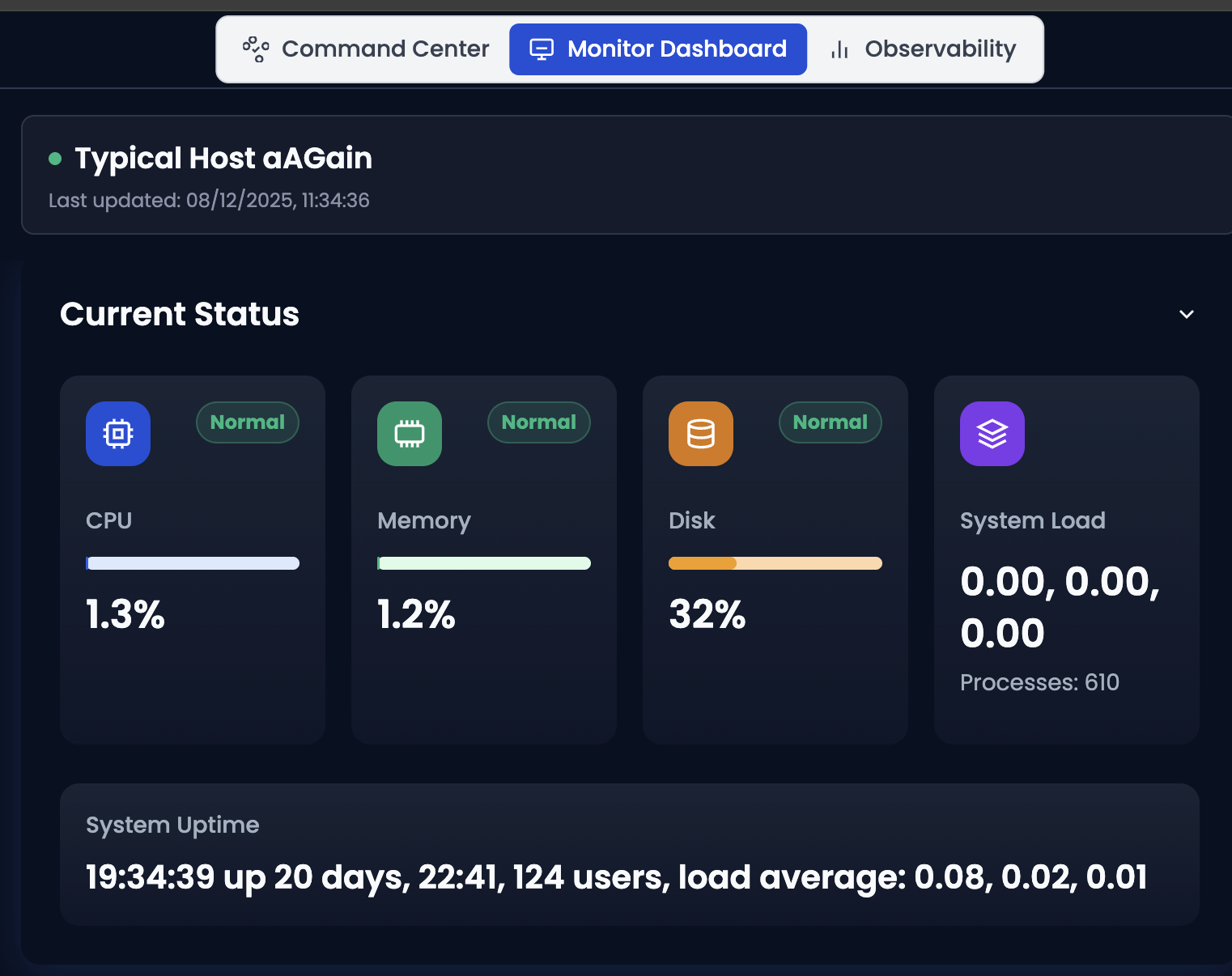
CPU/GPU utilization, memory and storage levels
-
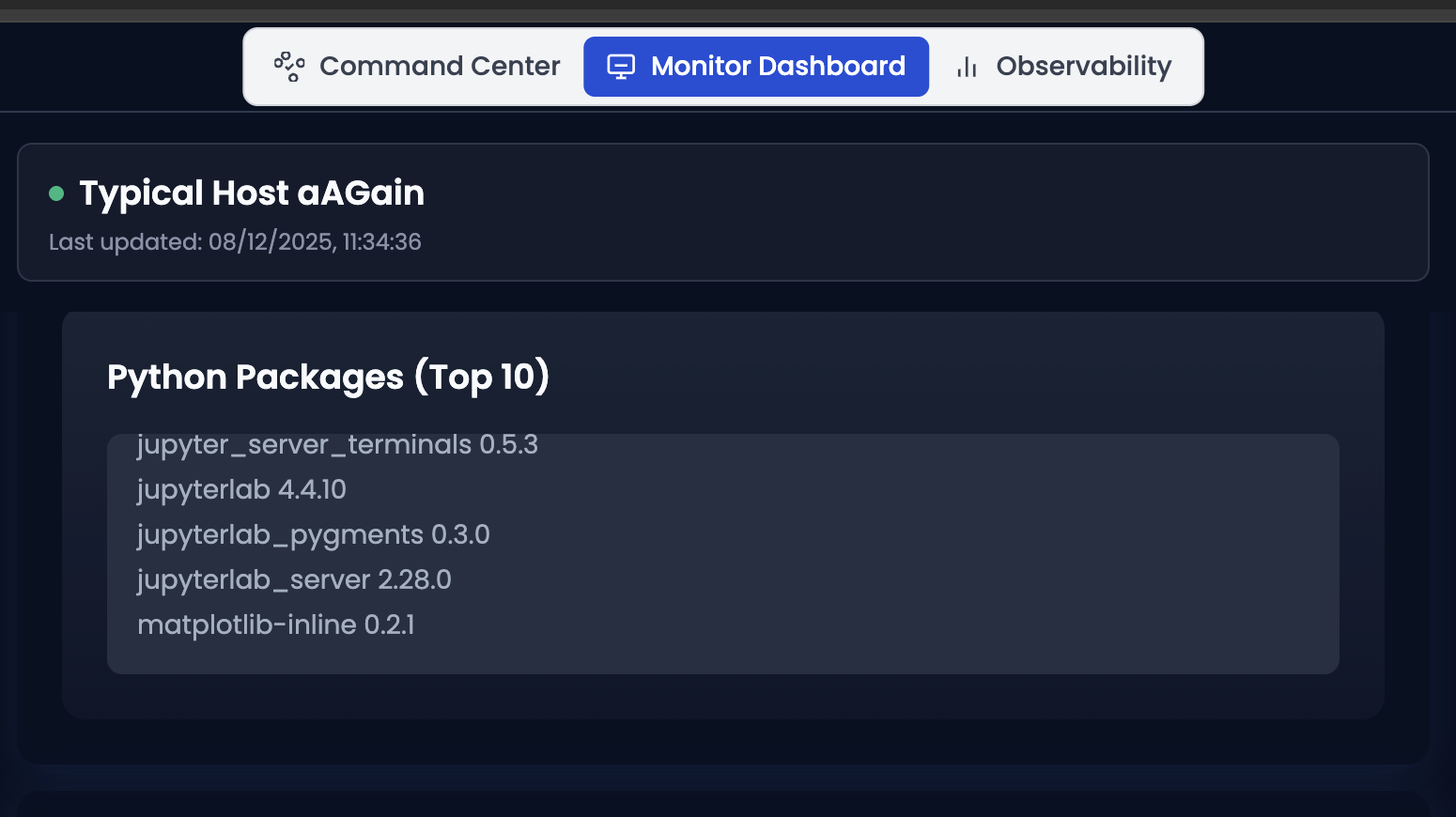
Python versions and library versions
- CUDA, cuDNN, and ML framework versions
- Active system and training processes
All detected metadata is continuously synchronized into the Skyportal Monitoring Dashboard, giving users a real-time, authoritative view of their entire compute fleet.
4. Unified Multi-Host Management Interface
Users can now manage unlimited hosts from a single unified interface:
- One-click host switching
- Parallel terminal sessions
- Unified agent chat across all hosts
- Centralized monitoring
- Shared access control
This turns multiple machines into a single logical compute fabric that can be operated through a single UI and agent brain.
5. Optional Automatic Jupyter Notebook Provisioning
For interactive workflows, Skyportal provides optional one-click Jupyter provisioning on any connected host:
- Secure token-based access
- Remote kernel execution
- GPU-enabled notebook support
- Environment-aware kernel binding
- Automatic port management
This eliminates manual notebook setup and firewall configuration across remote systems.
6. One-Click Remote Data Source Integration
Skyportal enables direct integration with external data platforms through a one-step secure credential workflow. Supported sources include:
- PostGres
- S3
- Snowflake
- Other S3-compatible object stores
Once connected:
- All managed hosts gain secure access
- Credentials are encrypted and isolated per host
- Data can be streamed directly into training jobs
- No manual key distribution is required
This enables distributed training workloads to securely access centralized datasets without operational friction.
7. Proactive Host Configuration via Autonomous Agent
The Skyportal Agent now performs proactive configuration management based on live environment state:
- Detects incompatible library versions
- Identifies driver mismatches
- Flags missing system dependencies
- Identifies GPU runtime failures
- Detects memory and disk misconfigurations
The agent does not merely report issues—it actively proposes fixes and can automatically apply them with user confirmation.
8. Automated Dependency Conflict Resolution
The agent now performs cross-layer dependency resolution between:
- Hardware
- Drivers
- CUDA runtime
- ML frameworks
- Python libraries
- Training code
This includes:
- Automatic uninstall / upgrade scheduling
- Environment isolation
- Driver-framework compatibility enforcement
- Rollback safety for failed changes
This drastically reduces system breakage caused by version drift.
9. Model-Aware Optimization Intelligence
The Skyportal Agent now analyzes:
- Model architecture type
- Training vs inference workloads
- Dataset format, size, and distribution
- Available system resources
Based on this data, the agent provides optimization recommendations, including:
- Batch-size tuning
- Precision mode selection
- GPU vs CPU execution
- Data pipeline optimization
This transforms the agent into a performance advisor—not just a system operator.
10. Unified Experiment Observability (Weights & Biases-Compatible)
Every experiment executed on any registered host automatically becomes observable within Skyportal's Observability Dashboard, assuming the training code is instrumented with Weights & Biases.
Features include:
- Real-time metric streaming
- Loss and accuracy charts
- Resource utilization overlays
- Cross-host experiment comparisons
- Run versioning and history
This gives users enterprise-grade experiment tracking without deploying separate observability stacks.
11. Impact Summary
This release transforms Skyportal from a beta connectivity tool into a true AI infrastructure operating system:
- Hosts become autonomous compute nodes
- Environments become self-aware
- Training becomes observable by default
- Data access becomes frictionless
- Configuration becomes proactive
- Dependency management becomes autonomous
Infrastructure is no longer passive. It becomes an intelligent system.
12. Next Phase
Future releases will extend Host Management into:
- Distributed multi-host orchestration
- Autonomous failure recovery
- Predictive capacity planning
- Model lifecycle automation
- Enterprise policy enforcement
Skyportal Host Management v1.0 is the foundation of Autonomous Infrastructure.